
Event Staff Planning Software: Optimal Use in 2026
Find the ideal event staff planning software for 2026. Define requirements, compare tools & efficiently involve your team. Start now and optimize!
You know the situation. The event is almost here, somewhere the latest Excel file is circulating, the first temp calls in sick via messenger, a team leader asks about the meeting point, and you’re not sure if all positions are really covered during setup. At that moment, you realize that your biggest problem isn’t a lack of staff, but the missing overview.
Many teams try to manage this chaos with spreadsheets, phone chains, and chat groups. That works until multiple locations, shift changes, qualifications, and last-minute adjustments come together. Then planning turns into pure firefighting. Good event staff planning software won’t magically take away this unrest. But it creates a central place where availabilities, assignments, hours, messages, and proofs come together. And that’s exactly where clean operational work begins.
Meta Description: Want to plan your event staff without Excel chaos? Learn which software really helps you daily, which GDPR pitfalls to avoid, and how to smoothly integrate your team into the new workflow.
Table of Contents
- From Paper Chaos to Digital Staff Planning
- What Your Software Really Needs to Do
- Finding the Right Software for Your Event Business
- How to Successfully Introduce the New Tool to Your Team
- Shift Planning and Communication in Daily Life
- GDPR, Success Measurement, and Avoiding Common Mistakes
From Paper Chaos to Digital Staff Planning
Two days before a trade fair in Zurich, the same thing often happens. The hostess list is in one version on the laptop, the logistics helpers are in another file, the phone number of a floater is only on a team leader’s private phone, and the client asks who will handle the early check-in at the entrance. If you then confirm shifts via chat but update changes again in Excel, you almost inevitably build in contradictions.
It gets especially tricky when you have to fill different roles simultaneously. An everyday example: For a food festival, you need setup crew, cashiers, bar staff, runners, and teardown crew. Some people can take on several tasks, others only specific ones. If you manage this manually, you quickly lose track of who has already confirmed, who is only tentatively available, and who absolutely needs a certain qualification.
Practical Rule: As soon as you jump between files, chat, and phone for an event, you lose not only time but also reliability.
With centralized software, the same process runs much more smoothly. You create the assignment, assign shifts and tasks, collect availabilities in one place, and see responses directly there. If someone cancels, you no longer search through old messages but filter for suitable staff and send the request specifically to the right people.
What is often underestimated: Digital planning is not just about convenience. It creates traceability. You see who was invited when, who confirmed, who was replaced, and which hours were actually worked in the end. That’s exactly why it’s worth taking a look at a practical guide to digital deployment planning if you want to switch from scattered lists to a clean workflow.
Where Manual Planning Fails in Event Daily Life
- Last-minute changes: A morning absence triggers multiple inquiries if no one sees the current status centrally.
- Unclear responsibilities: Team leaders, dispatch, and project management work with different information.
- Missing proofs: Confirmations, shift swaps, and hour corrections are hardly verifiable later.
- Data protection risk: Personnel data ends up in private chats, local files, or open distribution lists.
What Your Software Really Needs to Do
Many buy too early. The demo looks good, sales promises easy planning, and only in live operation do you realize your team can see shifts but can’t swap them cleanly. Or catering staff and stage crew are in the same system, but you can’t filter qualifications properly.
That’s why you start not with the vendor list but with your assignments. A medium-sized agency planning trade fair hostesses and logistics helpers has different requirements than a wedding venue with service staff or a security service with fixed proofs. The right approach is a short self-test before every demo.
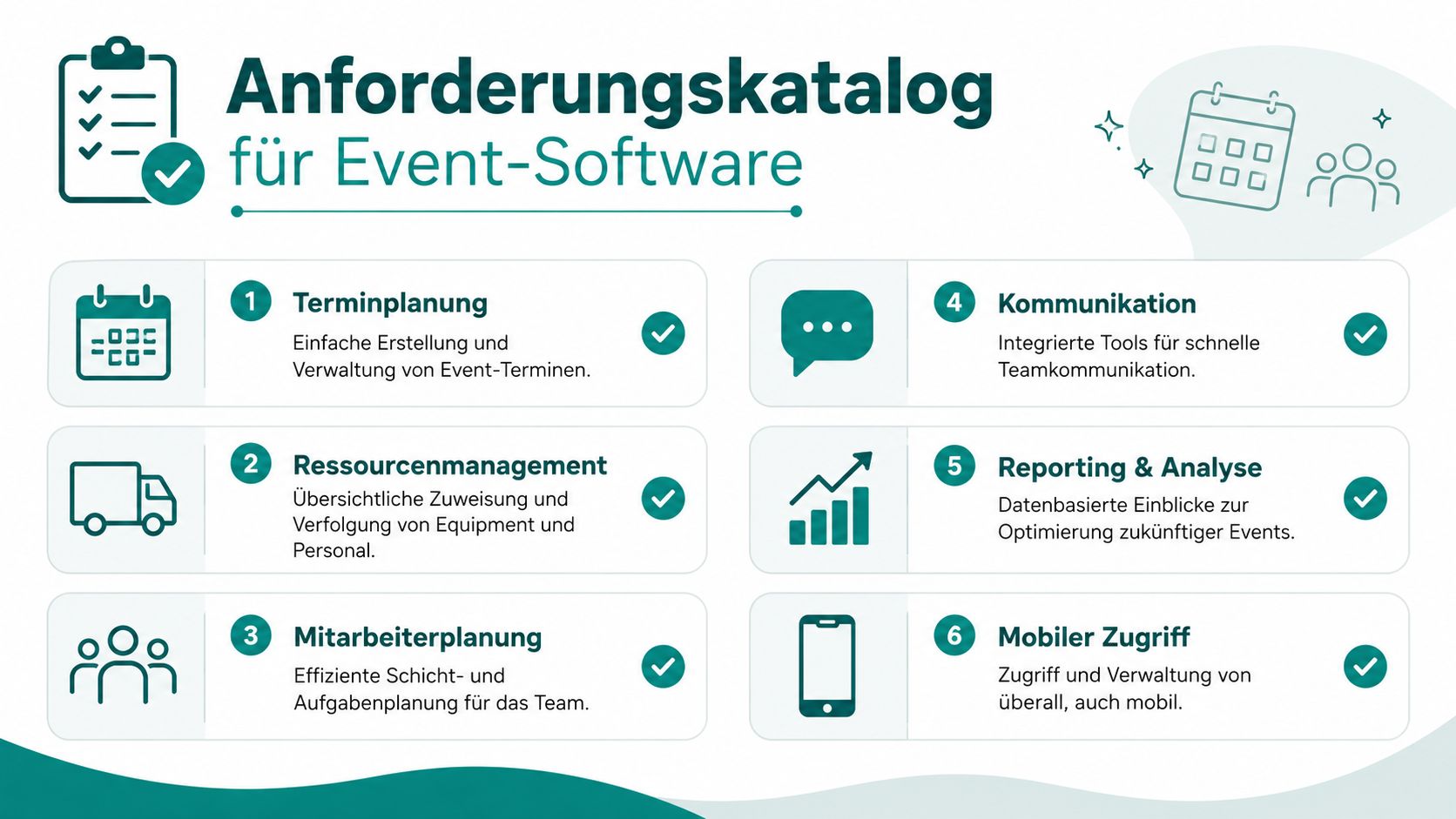
Start with Your Processes, Not the Demo
Take a real event from recent months. Not your smoothest, but the one with the most changes. Walk through the process once.
- Before staffing: How do availabilities come in today? By email, chat, phone, or form?
- During selection: Do you need to filter by language, experience, dress code, location, or proofs?
- On event day: Does your team need an app with address, contact person, briefing, and check-in?
- Afterwards: Do hours need to be approved and handed over for payroll preparation?
If you don’t clearly write down these points, you might buy a calendar management tool when you actually need a tool for shift control, communication, and hour verification.
These Questions Save You an Expensive Mistake
A tool can do a lot on paper and still annoy in daily use. These questions help you choose:
| Question | Why It Matters | Practical Example |
|---|---|---|
| Can you maintain and filter qualifications? | You don’t want to ask everyone, only suitable people. | Only employees with catering experience get the bar shift. |
| Are there roles, locations, and shift templates? | Recurring events shouldn’t be rebuilt every time. | The same basic structure is loaded again for stadium catering. |
| Does mobile use really work smoothly? | Your team rarely sits at a desk. | A hostess confirms the assignment directly on the train. |
| Can communication be sent precisely? | Not every change affects everyone. | Only the teardown crew gets the new loading zone info. |
| Is there time tracking with correction workflow? | Hour questions otherwise cost a lot of dispatch time. | A shift end is checked and approved by the team leader. |
If the software only allows every little thing through the central office, it slows you down. Good tools give the field team enough self-service without losing your control.
Also watch out for things that often get overlooked in demos:
- Permissions: Who can only read, who can plan, who can change hours?
- Documents: Can briefings, assignment info, or proofs be attached directly to the assignment?
- Change log: Can you see who moved or confirmed a shift?
- Absences: Can vacations, sickness, and blackout periods be clearly maintained?
The term event staff planning software often sounds like a simple planning board. But in daily life, it matters whether the tool maps your real workflow. If you choose carefully here, you save detours, additional tools, and constant manual work later.
Finding the Right Software for Your Event Business
With your requirements catalog, the comparison suddenly becomes much more sober. The winner is not the provider with the most features but the one who cleanly solves your recurring problems. For event teams, three points are usually decisive: filling shifts, quickly distributing changes, and closing worked hours without confusion.
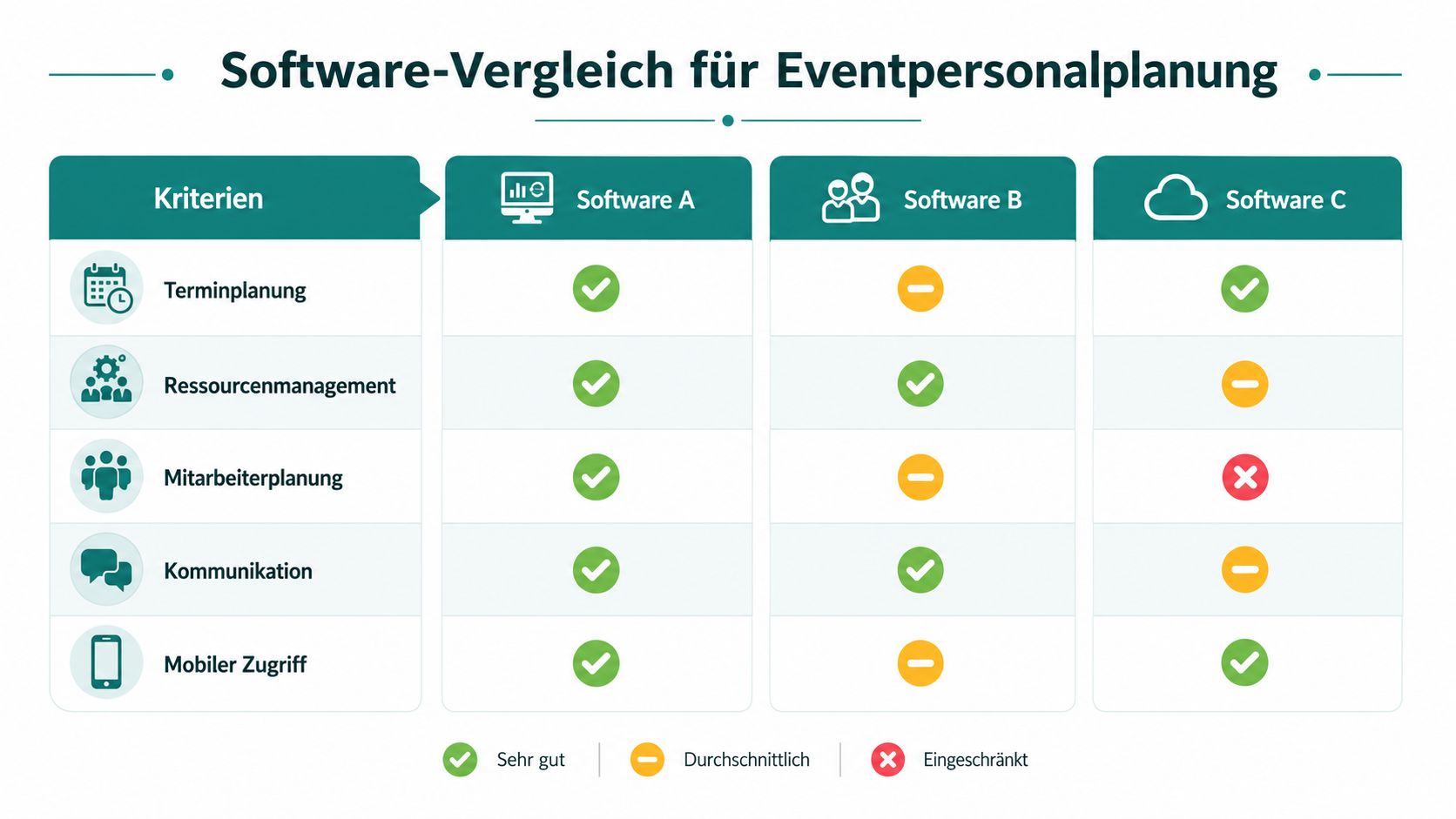
A realistic comparison looks different from a nice feature list. Take a typical scenario. You plan a city festival with several areas. Someone from the catering team calls in sick, more people are needed at the entrance due to weather changes, and the client wants to know in the evening who was really there. These are exactly the cases where a solution proves itself.
All-in-One or Multiple Single Solutions
Many teams face the same choice. Either one platform covers availabilities, shift planning, communication, and time tracking. Or you combine several tools, such as calendar, messenger, form tool, and time tracking.
All-in-One fits well if you have many changes, mobile teams, and tight scheduling. The advantage is not only convenience. You avoid media breaks. When a confirmation goes directly into the assignment and the worked hours later attach to the same data record, you save inquiries and searching.
Single solutions can suffice if you manage few events in parallel or have very special requirements. The disadvantage usually shows when info must move from one tool to another. That’s where double maintenance, misunderstandings, and missing traceability arise.
An example: An agency plans trade fair staff in one tool, communicates in a chat, and collects hours via forms. As long as everything runs smoothly, that works. Once shifts are swapped or corrections appear, someone has to manually gather the info. That costs nerves.
How to Recognize if the Tool Is Practical in Tests
Never just look at the admin backend. Always test two sides: your view as planner and your staff’s view in the app.
- Availability query: Can you specifically ask a suitable group or is everything sent as a mass message?
- Shift assignment: Does staffing run quickly or do you click through multiple screens?
- Employee app: Can employees find location, time, contact person, and briefing without asking?
- Time tracking: Can someone clock in and out cleanly without constant manual corrections?
A structured comparison of shift planning software is worthwhile if you want to test multiple systems side by side.
A solution like job.rocks can be interesting in setups where you want to map availability queries, shift planning, mobile access, time tracking, and payroll preparation in one place. This is not an argument for every company. It fits especially where many flexible workers, changing locations, and short reaction times come together.
Don’t buy software based on feature quantity. Buy it based on how smoothly your most chaotic event day runs in it.
Also pay attention to the price behind the price. Not only the license counts. Training effort, add-on modules, manual follow-up, and support issues often hit harder than the monthly fee. If you check this openly during testing, the decision usually becomes clearer.
How to Successfully Introduce the New Tool to Your Team
The biggest trap is not the purchase but the introduction. If your team experiences the new tool as extra work, they stick to old chats and private lists. Then you have double maintenance instead of order.
That’s why you must keep the start small, clear, and close to daily life. Not the whole company at once, but first the people who really plan and correct.

First the Planners, Then the Field Team
Start with a small group. Dispatch, project management, and an experienced team leader are often enough for the first run. These people build templates, test permissions, and quickly report where the process still stumbles.
Resistance usually doesn’t come from rejection but uncertainty. If a team leader worries about losing overview with last-minute changes, you don’t have to explain the whole software. Just show her the daily process she needs: open assignment, see team, send message, confirm hours.
This start has proven effective:
- Technical setup first: Roles, locations, templates, qualifications, and message groups must be ready before inviting the field team.
- Pilot with a real event: Don’t take a test assignment without pressure. Take a manageable real event.
- Clearly end old channels: If shift changes are still allowed via chat, the new process immediately collapses.
Training: Short, Concrete, and Close to the Assignment
Many trainings are too long and abstract. In event operations, you don’t need a tour through every menu. You need the few daily steps.
A short training for employees should only cover these points:
- Accept or decline an assignment
- Find assignment details
- Report absence or problem
- Clock in and out
- Properly initiate shift swaps
Don’t just tell the team what changes. Tell them what becomes easier for them. Fewer inquiries, clear info, fair traceability of hours, and quick reporting of changes.
For planners, it can go a bit deeper. There, permissions, corrections, substitutions, and approvals are more important than pretty interfaces. After a first practical day, a short follow-up is worthwhile. Not as a big meeting, but directly on points that disturbed the assignment.
If you want to show how other teams organize the switch, this video helps as a concrete conversation starter:
One last tip from daily life: Appoint one person per shift or location who is proficient in the new tool. This noticeably reduces inquiries to dispatch and prevents every little thing from ending up with you again.
Shift Planning and Communication in Daily Life
Monday morning. Three events for the week are open, one client postpones the start time, two service staff report blackout days, and someone with driver experience is still missing for a promo assignment. This is exactly where it shows whether your planning only looks digital or really takes work off your hands.
If you work cleanly, the week doesn’t start with a blank slate but with templates. Recurring assignments should be created as patterns. So you don’t copy old lists but take over roles, times, meeting points, and internal notes directly into the new schedule.
A Typical Week Start in Dispatch
Let’s take an example. You plan a corporate event on Tuesday, a festival on Friday, and a wedding on Saturday. For the corporate event, you need reception, cloakroom, and service. The festival has several shift blocks with setup, operation, and teardown. The wedding is small but with a tight schedule.
Instead of asking everyone at once, you proceed in stages:
- First the fixed roles: Team leadership, cashiers, drivers, key positions.
- Then the larger groups: Service, runners, promotion, bar.
- Finally the reserve: People who can step in if someone cancels last minute.
This keeps the plan stable before you assign the broad mass. If you juggle work time patterns, comprehensive information on work time models is helpful, especially if you want to build evening blocks, handovers, or staggered start times cleanly.
When Someone Calls in Sick on Event Day
The real test comes on assignment day. At six in the morning, someone calls in sick. In an old setup, you would now search phone numbers and message several people in parallel. In good event staff planning software, you filter by available, suitable, and nearby. Then the request goes only to people who really qualify.
Communication must be targeted. Not everyone needs every message.
| Situation | Good Message in the Tool | Bad Message in Chat |
|---|---|---|
| Meeting point changes | Only to the affected team with new address and time | Message to everyone, including people without assignment |
| Dress code missing | Directly in the assignment as mandatory info | Somewhere in group chat among inquiries |
| Shift swap | With approval process and documentation | By word of mouth, without clear status |
| Hour correction | Traceable with confirmation | Later discussed via individual chat |
The process around hours is also important. Let employees see their time directly in the system and approve deviations promptly. If someone had to leave early, that shouldn’t only appear days later in an email.
The shorter the path between assignment, feedback, and hour approval, the fewer disputes you have later about alleged absences.
These routines have proven effective in daily life:
- Reminders before shift start: This reduces the risk that someone misses time or place.
- Message groups by role: Keep bartenders, setup crew, entrance, or stage hands separate.
- Digital shift changes with approval: Swaps yes, but never without visible confirmation.
- Short briefing attached to assignment: Address, contact person, dress code, and last notes directly on the shift.
If your team lives these processes, not only does the hectic pace decrease. You also get a clear record of what happened when and who received which info.
GDPR, Success Measurement, and Avoiding Common Mistakes
As soon as personnel data, availabilities, phone numbers, qualifications, and hours are stored in software, you move not only in planning but also in data protection. Many teams only deal with this when an employee asks or a client wants to see documents. That’s too late.
GDPR starts with the question of which data you actually need. Not every piece of info you’d like to have may simply be collected and stored in advance. For event staff, clear, purpose-bound data fields are usually sufficient. Everything beyond that creates ballast and risk.
GDPR Starts Not with the Contract but in the Process
Check a tool not only for functions but also for everyday data handling.
- Storage: Where is personnel data stored and who has access?
- Rights: Can team leaders only see their assignments or the entire pool?
- Deletion: Can it be clearly controlled when data is removed or anonymized?
- Consent and information: Does your staff know which data is used for what?
If you want a compact introduction, a Important Note on Data Protection helps as a prompt for questions you should answer internally. For platform selection, also look at GDPR-compliant deployment planning and secure cloud platforms.
Signals That Show Your Planning Is Running Smoothly
You don’t need a data jungle. A few clear observation points are enough.
Watch for whether
- shifts are staffed early enough,
- last-minute absences are replaced in an orderly way,
- inquiries from the team decrease,
- hour corrections are rare and traceable,
- the same mistakes reoccur in certain assignment types.
These signals help you doubly. They show if the process works and reveal data protection weaknesses. For example, if private messengers are constantly used even though the tool supports messaging, it’s often not a technical problem but a poor process or unclear permission settings.
Three Mistakes That Keep Happening
The first mistake is treating the software only as a digital Excel sheet. Then you enter shifts online but use neither role logic, availabilities, nor approvals. You waste the real benefit.
The second mistake is too broad data access. Not everyone in the team needs to see everything. The cleaner you set permissions, the smaller the risk of unauthorized access and unnecessary discussions.
The third mistake is lack of discipline after go-live. If shift swaps, sick reports, or hour corrections happen outside the system again, documentation immediately falls apart. Then neither your evaluation nor your data protection concept is correct.
Those who set up their event staff planning software cleanly, collect only necessary data, and consistently keep daily business in the system end up with not only more calm in dispatch. You get reliable workflows you can build on for every new event.
If you want to switch your event planning from Excel, chat, and individual agreements to a clean digital process, check out job.rocks. The platform covers availability queries, shift planning, mobile access, time tracking, and payroll preparation in one system, making it a good fit for event teams with many changing assignments.