
Fitness Studio Shift Scheduling Software: The Practical Guide 2026
Shift scheduling software 2026 for fitness studios: Which features your studio needs, what Swiss regulations require, and how to implement shift plans cleanly.
Monday morning, 6:00 a.m. A class instructor calls in sick, the reception desk needs to be staffed with two people from 9:00 a.m., and the shared Excel sheet already has three versions of the same schedule. You shuffle shifts, call employees, and hope that by evening a qualified person is still at the reception and in the class room.
This is exactly where your fitness studio shift scheduling software proves whether it is really suitable for everyday studio operations. A calendar with names and times is not enough. You need qualifications, availabilities, rest periods, substitutions, mobile confirmations, time tracking, and a clean handover to payroll in a transparent process.
The Swiss fitness industry had 1.37 million members as of 31.12.2024, corresponding to 15.2% of the total population and a growth of 4.7% compared to 2023. For people aged 15 to 65, the penetration rate was 22.6%. More members usually mean more classes, more reception staffing, and more last-minute changes in everyday studio life. (Key Data Study 2025 by swiss active)
Table of Contents
- Why the classic shift schedule in fitness studios is no longer enough
- These features your shift scheduling software really needs
- Time tracking in Switzerland: what your schedule must be able to do
- Cleanly separate class schedule vs. personnel shift schedule and substitutions
- Mobile shift confirmation and clocking in everyday studio life
- ROI of shift scheduling software in fitness studios
- Implementation checklist for the first 30 days
Why the classic shift schedule in fitness studios is no longer enough
At 6:15 a.m. the first change is done but not yet properly documented. You deleted the canceled Pilates shift from one Excel file, entered the new instructor in another file, and informed reception via group chat. One person now works longer, but no one immediately sees if this violates the rest period before the next early shift.
The problem is not that Excel is fundamentally unsuitable. A manageable table can work for a simple schedule. But as soon as multiple locations, part-time staff, course qualifications, holidays, sickness, and last-minute swap requests come together, Excel lacks the logic for operations. You see cells, not the consequences of a change.
Practical rule: If you have to secure every schedule change by phone, chat, or a second table, you are no longer managing a shift schedule. You are managing its side effects.
What exactly is lost on Monday morning
With manual shifting, you typically lack:
- Version control: You don’t know for sure which file was last approved.
- Rest period checks: The sheet does not reliably warn you about switching from late to early shifts.
- Substitution logic: A sick instructor is not automatically replaced by someone with the right qualifications.
- Availability management: Employees do not update their free times directly in the schedule.
- Payroll handover: Planned, actually worked, and changed hours remain separated.
You feel the consequences the same day. Overtime appears without clear reason, the evening reception is only staffed with one person, a class is rescheduled, and members complain about an unattended counter. Swiss centers recorded an average of 5,385 check-ins per center per month in 2023, about 1.3 training sessions per member per week. This utilization makes every gap in staffing visible. (Key Data Study 2024 by swiss active)
If you continue working with Excel, a clean setup is worthwhile as a basis, for example following the guide professional shift scheduling with Excel. For a studio with changing classes and fringe times, however, you then need a solution that checks changes, involves employees, and forwards data to payroll preparation.
These features your shift scheduling software really needs
You don’t recognize good software by a nice weekly view. The decisive factor is whether it maps your real studio cases. Don’t just let a demo show you how to create a shift. Give the provider a canceled late shift, a missing qualification, and a last-minute swap.
Shifts visible and quickly editable
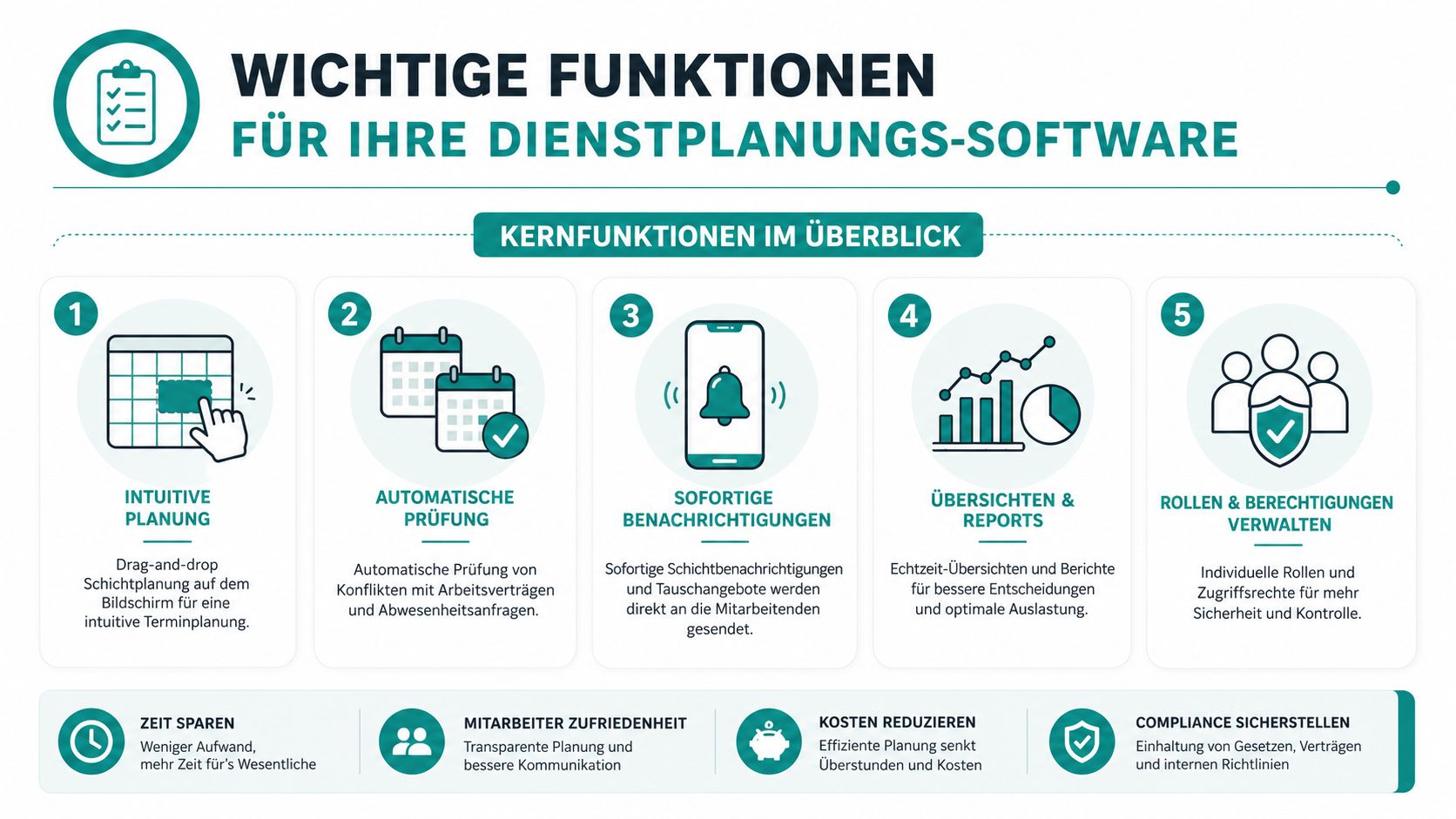
Drag-and-drop makes sense if you don’t just move boxes. If you drag an early reception shift to a part-time employee, the software must immediately show whether contract, availability, qualification, and rest period fit. For example: You move the reception shift from 6:00 a.m. to 2:00 p.m., while the person was scheduled until 10:30 p.m. the previous evening. The warning must appear during the move, not only at the month’s end.
Automatically check conflicts
The minimum check includes working hours, breaks, absences, contract hours, and rest periods. A system without this check is just a digital writing surface. That does not justify switching from Excel.
Set qualifications as fixed conditions
A trainer must not take over sauna supervision just because they are free. Store qualifications, validity dates, and required training. If a certified Pilates instructor is absent, the software should only suggest people whose matching certification is valid.
Directly query availability and substitutions
Employees should be able to enter free times, holidays, and sick notes themselves. For an open shift, the suitable group receives a request, confirms or declines, and you keep the approval. The swap is only valid once qualification and working time are checked.
An overview of space occupancy and availability can be mentally compared to a space planning guide for modern offices. In fitness studios, course types and staff suitability must additionally be linked.
Evaluate hours, absences, and fairness
Your minimum standards are:
- Early and late shifts: Distribution must be visible over the chosen period.
- Absences: Holiday and sick leave accounts must appear in the schedule.
- Overtime: Deviations between planned and actual must be traceable.
- Utilization: You should see on which weekdays reception, classes, and training areas are staffed differently.
- Approvals: Changes need a clear history with person and timestamp.
For a comparison of features and use cases, you can also consult the shift scheduling app guide. Decide only after testing with your own shifts. If the provider only shows standard cases, the most important part of the check is missing.
Time tracking in Switzerland: what your schedule must be able to do
If a receptionist stays longer due to a canceled class, this change must not disappear in daily business. The published shift schedule shows only the planning. For your studio, you need a traceable path from the planned shift through mobile clock-in and clock-out to approved corrections and handover to payroll.
In Switzerland, employers must generally document working hours. This includes start, end, and breaks longer than 30 minutes. Records must be kept for at least five years. The canton of Graubünden describes requirements for systematic recording of working and rest times in its guidelines on time tracking of the canton of Graubünden. A detailed overview of time tracking in Switzerland helps you with classification.
Translate rules into concrete software checks
| Rule | Limit | Software check |
|---|---|---|
| Rest period between two working days | 11 hours, once per week reduction to 8 hours possible if two-week average of 11 hours is maintained | Warning or block for early, late, and weekend combinations |
| Breaks during daily working time | More than 5.5 hours, at least 15 minutes; more than 7 hours, at least 30 minutes; more than 9 hours, at least 1 hour | Automatically schedule breaks and mark missing breaks |
| Working time documentation | Start, end, and breaks over 30 minutes | Save clock times, corrections, and approvals |
| Retention | At least 5 years | Ensure export and audit-proof archive |
| Night work | Usually 11:00 p.m. to 6:00 a.m. | Detect night times and show special rules |
| Night work duration | Maximum 9 hours within 10 hours | Check shift block and issue warning |
You can also find rules on working and rest times at SECO on working and rest times. For a simple transitional solution, the Excel template for recording hours is suitable. It neither replaces checking your shifts nor a secure history and payroll handover.
Night and Sunday work generally require permission. This concerns, for example, long studio events or Sunday openings. The software marks such cases but does not decide on their legality. Check permits, access rights, order processing, deletion concepts, and data export. Swiss hosting alone does not answer these data protection questions.
Cleanly separate class schedule vs. personnel shift schedule and substitutions
The public class schedule answers a simple question: What does your studio offer when? The personnel shift schedule answers another: Who works at this time and with which task? Both views belong together but must not merge into one confusing table.
A class may be publicly announced at 6:00 p.m., while internally a trainer, a receptionist, and a room controller are scheduled. The class schedule needs format, room, and start time. The personnel shift schedule additionally needs start of work, end of work, break, qualification, location, and contract reference.
| Dimension | Class Schedule | Personnel Shift Schedule |
|---|---|---|
| Purpose | Offer for members | Staffing for employees |
| Content | Class format, time, room | Person, shift, task, break |
| Visibility | Public or member-related | Internal, role-restricted |
| Change | Class is moved or canceled | Replacement is sought and approved |
| Check | Room and class format | Qualification, availability, rest period, and hours |
Substitutions need rules
If a licensed Pilates instructor is absent, you must not simply assign the next available person. The software should filter by the same certification and valid training. Then it checks if the replacement fits into the existing work week.
This also applies to indoor cycling. A colleague may be professionally suitable but already have a full late shift. If the replacement leads to exceeding allowed working hours, the request must be blocked or clearly marked.
A substitution is only confirmed when expertise, working time, and availability all fit together.
The separation also protects privacy. Instructors do not have to distribute private calendars or phone numbers to all team members. They see relevant shifts while you control internal planning and member views separately.
Mobile shift confirmation and clocking in everyday studio life
A mobile solution does not have to be spectacular. It must work on Sunday evening when no one is at reception anymore. Lara opens the app, sees her three shifts for the coming week, and confirms the morning shift with a tap. She marks the midday slot as unavailable.
The system asks a suitable colleague. He receives a notification, checks the assignment, and agrees. You approve the swap; only then does the change appear as a binding shift. This keeps clear who requested, who agreed, and who finally confirmed.

Clocking in without detours
Upon arrival, Lara clocks in via a tablet at reception or her own smartphone. If you use location verification, GPS reception and studio Wi-Fi must reliably work together. If the connection fails, the app needs offline caching and must synchronize data later.
Four checks matter in everyday life:
- Permissions: Part-time staff see only their own shifts and those released for swaps.
- Notifications: Changes, open shifts, and sick notes trigger clear alerts.
- Corrections: Forgotten clock-ins are requested, justified, and approved.
- Payroll preparation: Confirmed actual times go with change logs to the next process.
A mobile time tracking for changing locations is only useful if it fits the reception workflow. A shared tablet can be better for fixed teams than private devices. At multiple locations, test whether employees clock in and out at the correct studio.
Sick notes belong in the same process. Once an absence is approved, the open shift must become visible without uncontrolled changes to the entire schedule. This replaces WhatsApp chaos with clear responsibilities.
ROI of shift scheduling software in fitness studios
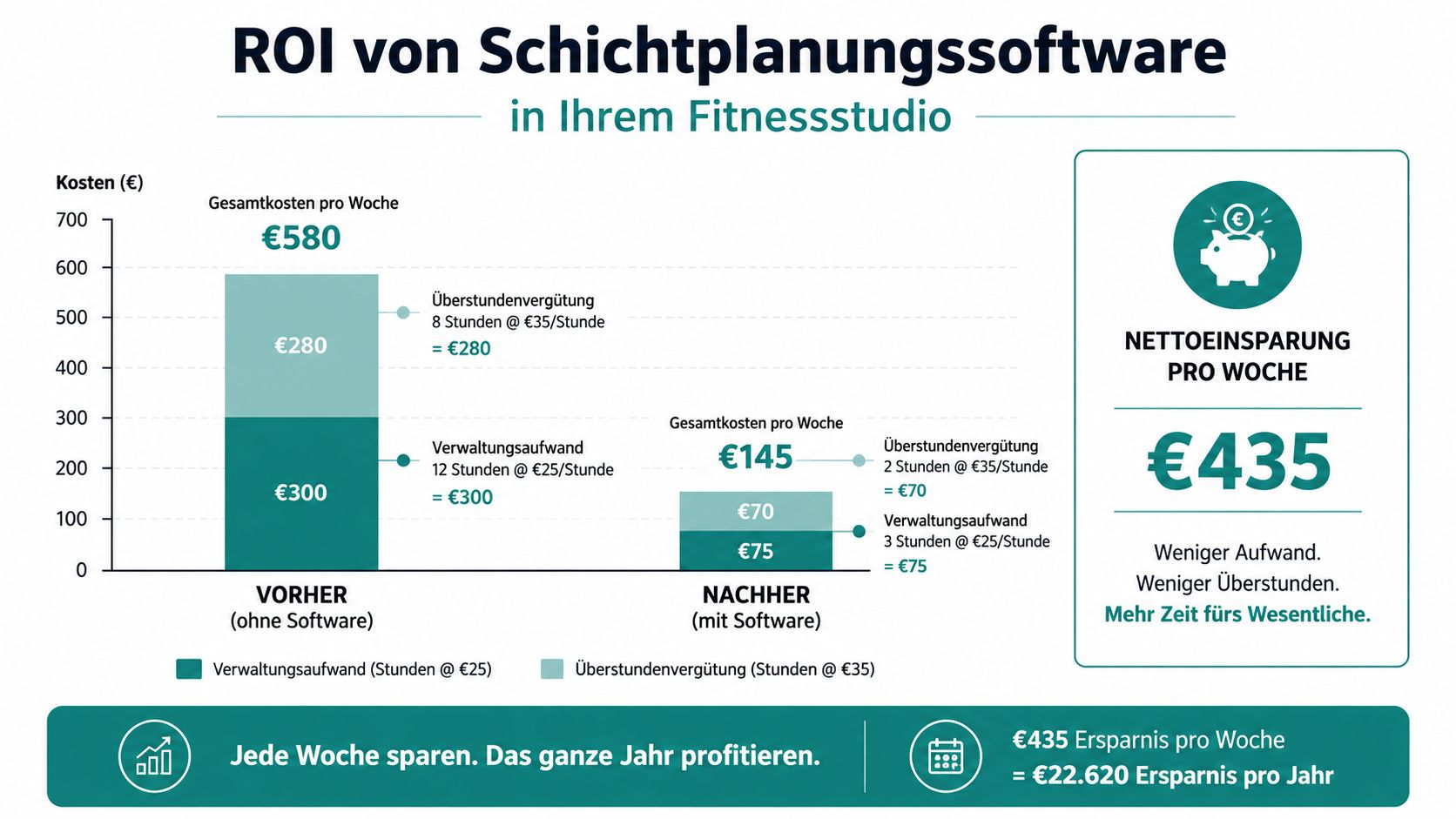
The ROI shows in everyday studio life where a last-minute absence disrupts the schedule: extra calls, overtime, and a replacement not qualified for the assignment. A studio with three full-time and eight part-time employees currently has about four overtime hours per week at 25 CHF plus one to two last-minute substitute assignments with a 50 CHF surcharge. The software costs in this example 180 CHF per month.
The assumed effect is: 30% less overtime, halved substitute surcharges, and two hours less planning effort per week. This results in a monthly saving of roughly 800 to 1000 CHF compared to monthly costs of 180 CHF. In the first year, this corresponds to a factor of about four to five. The calculation remains an example. Do not transfer it uncritically to your studio.
Your own calculation
Separate three cost blocks:
- Planning time: How many hours do you spend weekly shifting, calling back, and checking?
- Additional hours: What overtime arises from missing rest period control or late sick notes?
- Substitutes and errors: How often do you pay surcharges because a qualified replacement is missing?
Calculate with your own values. Incomplete clock-ins, late approvals, and wrongly assigned surcharges cause rework in payroll. Therefore, check how many corrections occur per month and how long their processing takes. These studio figures show your actual effort better than general labor market values. The Working hours and absences 2025 provide at most a general context.
Also evaluate soft consequences: fewer payroll errors, traceable working hours, and a fairer swap of early and late shifts. Do not artificially convert these points into CHF. Keep them separate and decide after one month with real operational data whether the software actually reduces effort.
Implementation checklist for the first 30 days
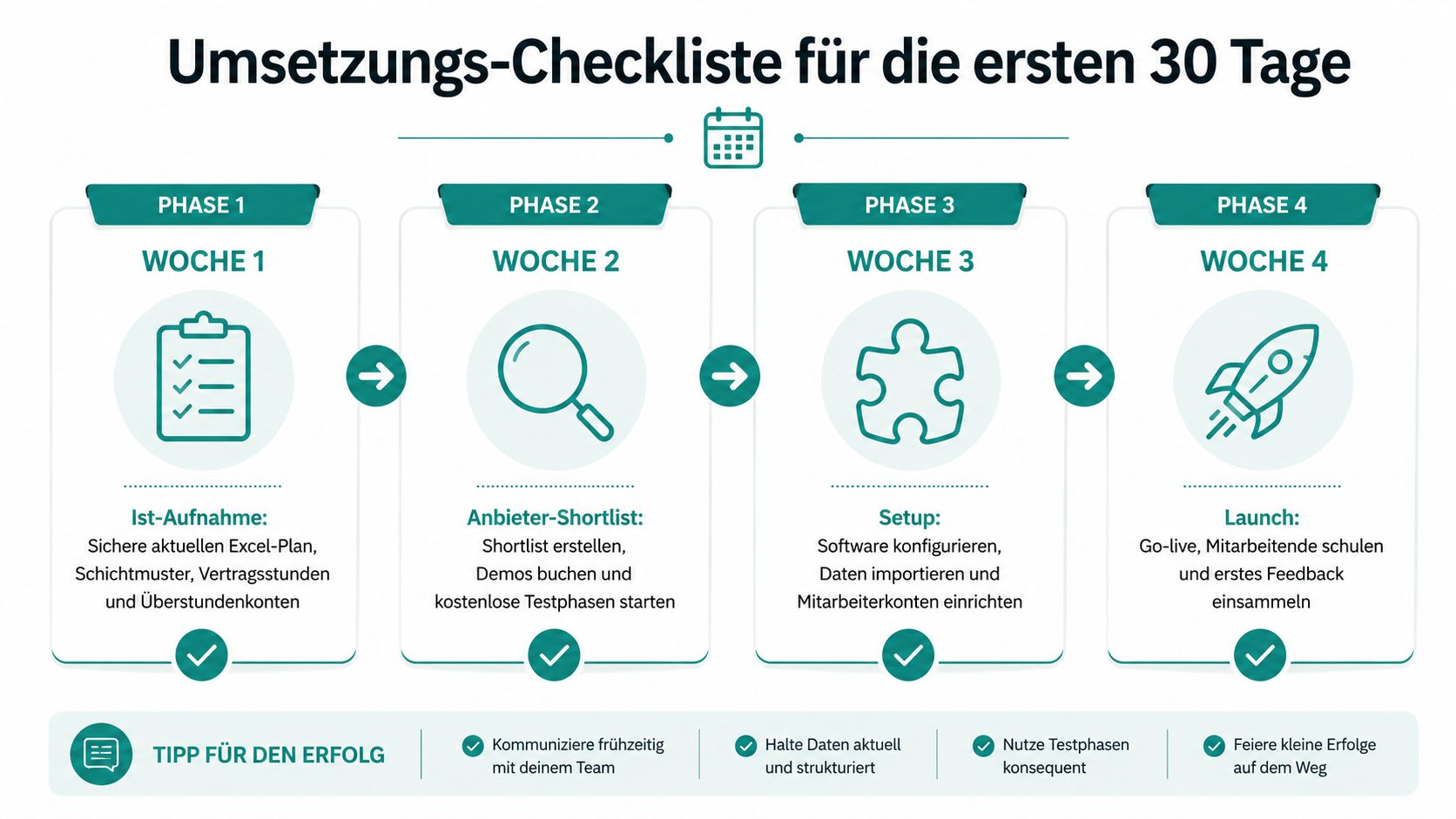
You don’t need a months-long test phase. You need clear responsibilities, real shifts, and one result per week. Don’t start with all special cases. Begin with reception, class operations, fringe times, and a typical sick case.
Week 1: start with the current state analysis
Secure the current Excel schedule, shift patterns, contract hours, and overtime accounts. Mark early, late, weekend, and class shifts. Note which qualifications are mandatory and who may take substitutions.
Responsible: Studio management, with one person from payroll.
Effort: One focused planning meeting plus review of existing data.
Result: A verified list of employees, shifts, qualifications, availabilities, and absences.
Week 2: test providers with real cases
Create a shortlist and arrange demos. Show each provider not only a normal weekly schedule but these cases: Pilates absence, late-to-early shift change, missing breaks, last-minute swap, and handover of actual hours to payroll software.
Check the payroll interface with a real example. Have them show how corrections, surcharges, breaks, and approvals are exported. A provider who only presents the calendar view has not understood your main work.
Result: A decision matrix with fulfilled, open, and unfulfillable requirements.
Week 3: set up a small pilot operation
Include three to five employees in the test group. Set up mobile accounts, import shifts, and test clocking in and out at reception. Then simulate a shift swap and a sick note.
Clarify data protection, role rights, retention, and handling of mobile location data. Also test connection failure. An app that only works with perfect Wi-Fi does not fit fringe times.
Result: An approved test schedule and documented corrections.
Week 4: roll out the operation
Transfer the schedule to all employees. Explain in writing when a shift is considered confirmed, who approves swaps, and how forgotten clock-ins are corrected. Handover the time records to payroll and set a fixed date for the first review.
Result: All shifts run in the new system, payroll preparation receives usable data, and open questions are on a short list with responsible persons.
job.rocks supports you with digital availability queries, shift scheduling, mobile time tracking, and handover of verified hours to payroll preparation. Check the suitable workflows for your studio and visit job.rocks to take the next step with concrete shift cases.